UX audit · Heuristic evaluation · Film industry platform
Film Saudi: where the filmmaker's journey breaks, and how to fix it
A heuristic evaluation of the Film Saudi platform and the services it connects to, Daw and Abde'a. I reviewed four areas against Nielsen's usability heuristics, rated every issue by severity, and mapped how the journey, the flows and the structure should work.
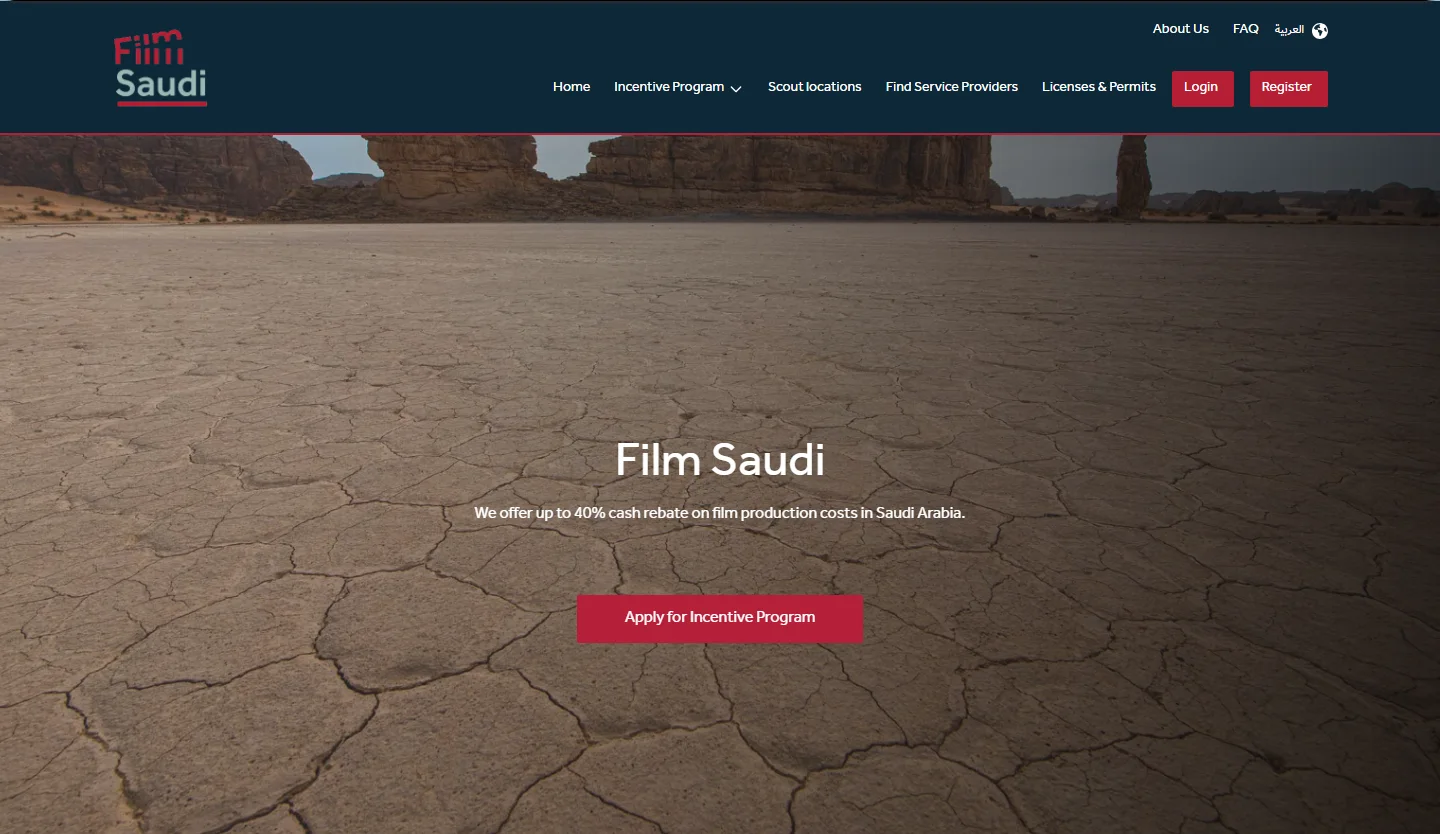
The Film Saudi home page hero, as it was at the time of the audit (archived copy, November 2025).
- Findings
- 10
- High severity
- 4
- Medium severity
- 6
- Areas reviewed
- 4
- Task scenarios
- 4
Four things a filmmaker comes here to do
Film Saudi is an initiative of the Saudi Film Commission that supports local and international productions in Saudi Arabia. It brings together the incentive programmes, filming locations and service providers, and it links out to Daw and to Abde'a, the platform for cultural licences and permits.
- 01
Get the incentive
Learn about the cash rebate and apply to a programme.
- 02
Scout a location
Find the right place to shoot.
- 03
Find a service provider
Find the companies and crew to work with.
- 04
Get the permits
Obtain permits and licences, through Abde'a.
These four goals are the spine of this case study. The journey, the flows and the findings all follow them.
- 01
The situation
To use a film incentive in Saudi Arabia, a filmmaker moves across three platforms: Film Saudi, Daw and Abde'a.
- 02
What I found
10 usability issues in four areas. Four are High: they can stop a user from finishing a task.
- 03
What I propose
A five-stage improved journey, six redrawn flows, a nine-tab structure, and a fix order that starts with the four High findings.
- The audit
- Carried out in October 2025, as an expert review of the Film Saudi website and the connected platforms.
- My role
- UX Designer. I led the heuristic evaluation, rated the issues and wrote the recommendations. A Product Designer worked with me on the evaluation.
Four areas, four tasks, one usability checklist
A heuristic evaluation is an expert review: I walk through the product against Jakob Nielsen's ten well-known usability principles and record every place where the design breaks one. It is a fast way to find problems, and each finding is a hypothesis to validate. The principle behind each finding is shown on its card.
What I reviewed
- 01
Navigation
Header navigation, dropdowns, footer, language toggle (AR/EN)
Assess consistency in navigation, the clarity of internal versus external links, and the accessibility of core tools.
- 02
Incentive Program
The Incentive Program page, Cashback, and the Daw pages (terms, application button)
Assess how clearly the offer and the application step are organised and presented.
- 03
Discovery
Scout locations and Find Service Providers
Assess the efficiency and usability of search and filtering, and the clarity of the results.
- 04
Forms
Contact Us form, login and registration
Evaluate how the system handles input and data, and how it guides the user when errors occur.
Four tasks I tested
01
Cashback eligibility
4 steps- From the home page, go to the Incentive Program section.
- Open the Cashback page.
- Find the maximum cash rebate percentage.
- Locate the first three core eligibility requirements.
02
Searching for a specific location
3 steps- Go to Scout locations.
- Use the filters to select the category "Mountain Environments" and "Accessibility".
- Select one location from the results.
03
Finding a service provider in a city
4 steps- Go to Find Service Providers.
- Search for "company".
- Apply the city filter "Jeddah" to narrow the results.
- Try the text search instead of the filters.
04
Registration and error handling
3 steps- Attempt to register or log in.
- Enter an invalid email format (for example "test@test").
- Try to submit the Contact Us form with a required field empty.
How I rated severity
- High
Prevents the user from fulfilling one or more tasks.
- Medium
Requires effort from the user and impacts performance.
- Low
May be perceptible to the user, but does not prevent execution or performance.
What filmmakers do today, and what blocks them
Mapping the journey shows where the friction is. The first two stages carry nine of the thirteen blockers recorded. And there is no stage for what happens after a request is submitted: users cannot follow it from account settings.
Arriving on the home page
Searching for programmes
Filming locations and service providers
Permits and licences (Abde'a)
- Register a new account
- Explore the platform content
- Scan the main sections in the navigation bar
- Choose a suitable programme
- Browse the programmes and their details
- Open the programme page
- Fill in and submit the form
- Browse suitable companies and locations
- Choose a company and check its contact details
- Contact the company to book the service
- Move to Abde'a to get permits and licences
- Search the services and check the conditions
- Sign in with Nafath to complete the request
- The official site is hard to find from a search engine
- Weak content and unclear categories do not guide the user
- No information on supported programmes or the latest news
- No search on the platform
- No clear comparison between programmes
- Incomplete data is not saved, so it is entered again on Daw
- Long forms
- File uploads sometimes fail
- A submitted request cannot be followed from account settings
- Searching for companies and locations is hard
- Users cannot tell which location suits the shoot
- So many services that choosing the right one is hard
- Users do not know which permit or licence fits their service
Confused
Confused
Overwhelmed
Confused
- 01
Arriving on the home page
What users do
- Register a new account
- Explore the platform content
- Scan the main sections in the navigation bar
What blocks them
- The official site is hard to find from a search engine
- Weak content and unclear categories do not guide the user
- No information on supported programmes or the latest news
- No search on the platform
Touchpoints
How they feel
Confused
- 02
Searching for programmes
What users do
- Choose a suitable programme
- Browse the programmes and their details
- Open the programme page
- Fill in and submit the form
What blocks them
- No clear comparison between programmes
- Incomplete data is not saved, so it is entered again on Daw
- Long forms
- File uploads sometimes fail
- A submitted request cannot be followed from account settings
Touchpoints
How they feel
Confused
- 03
Filming locations and service providers
What users do
- Browse suitable companies and locations
- Choose a company and check its contact details
- Contact the company to book the service
What blocks them
- Searching for companies and locations is hard
- Users cannot tell which location suits the shoot
Touchpoints
How they feel
Overwhelmed
- 04
Permits and licences (Abde'a)
What users do
- Move to Abde'a to get permits and licences
- Search the services and check the conditions
- Sign in with Nafath to complete the request
What blocks them
- So many services that choosing the right one is hard
- Users do not know which permit or licence fits their service
Touchpoints
How they feel
Confused
The emotion line follows the feelings row of the audit board: confused, confused, overwhelmed, confused.
Five paths that work today, and one that is missing
Every path starts on the home page and ends with a check on whether the task was completed. Two things stand out: the programme path asks users to apply twice, and there is no path at all for changing account details.
- Start or end
- Step
- Decision
- New or changed step
- Removed or replaced in the to-be
- Redundant step
Swipe or scroll sideways to see the whole diagram.
01Change my details
Not part of today's flow
02Track my requests
3 steps- Click "My account"
- Choose "My requests"
- Browse previous requests
03Apply to a programme
8 steps- Choose a programme
- View the details
- Apply
- Read the requirementsReplaced
- Apply againRedundant
- Have an account? Yes: log in. No: create an account, upload the files, verify the data, then log in.Decision
- Fill in the form
- Submit the form
04Find a filming location
4 steps- Browse all locations
- Set the filterReplaced
- Choose a location
- View photos and details
05Find a service provider
4 steps- Browse all providers
- Set the "Jeddah" filterReplaced
- Choose a provider
- Contact by phone or email
06Get a permit
8 steps- Go to Abde'a
- Browse the platformReplaced
- Browse all permitsReplaced
- Search by permit nameReplaced
- View the permit and how to get it
- Submit a request
- Fill in the data
- Send the request
Ten places where the journey breaks, four that stop the task
Findings are grouped by the journey stage where they appear. Open any card to read the full finding: the issue, why it matters, the recommendation, the heuristics it breaks, and the screen.
Navigation carries three of the four High findings, and the fourth is in Forms. The Incentive Program and Discovery areas have Medium findings only.
That was the as-is. This is how it should work.
The rest of the case study redraws the journey, the flows and the structure. Each one follows the same four goals, so the before and after can be compared side by side.
After users apply, the journey should not stop
The four stages stay, and a fifth is added: following requests and managing the account, so users are not left guessing after they submit. Each stage ends with one opportunity, a concrete improvement to design.
Initial search and the home page
Searching for programmes and checking the conditions
Searching for filming locations and service providers
Getting permits and licences (Abde'a)
Account settings and following requests
New stage- Search on Google with general terms
- Enter the platform, or register
- Explore the platform content
- Browse the latest news and the platform history
- Search the programmes and the supported projects
- Understand the requirements and compare programmes
- Check the cash rebate and Daw support conditions
- Choose a programme, fill in the form and upload documents
- Search for a suitable filming location
- Use advanced search and the interactive map
- Check the providers and locations the platform suggests
- Check the permit and licence that apply
- Browse the fitting permits on the Film platform first
- Choose the permit and review the conditions and fees
- Move to Abde'a to get the permit
- Sign in with Nafath, or on Abde'a, to complete the request
- Follow the status of requests
- Update the account data, or change the password
- NeedThe platform's history and the entity behind it
- NeedEverything about applying, and the other programmes
- PainMany files are required to apply to Daw
- NeedThe rebate rate and conditions for each film category
- NeedA clear classification of project types, and easy comparison
- PainHard to know which location suits the type of filming
- NeedComplete details, the company website and the service offered
- NeedAn interactive guide, and an updated, classified supplier list
- PainHard to know which service fits the user
- NeedTo know which service fits my request
- NeedTo track my request and know if it was accepted or rejected
- NeedOne dashboard with all current and previous transactions
Relieved
Relieved, with effort
Relieved, with effort
Relieved, with effort
Relieved
Add a prominent, effective search bar, and review the names of the main sections in the IA so they are clearer.
Offer a checklist that users can print or save to their device, with a reminder to complete the requirements by SMS or email.
Design request forms that fill in returning users' details from their profile, so they do not enter the same data twice.
Add a short section in the Film Saudi platform that explains which permits fit the user's request before they move to Abde'a.
Improve how requests are displayed, and give the user a full control dashboard.
- 01
Initial search and the home page
What users do
- Search on Google with general terms
- Enter the platform, or register
- Explore the platform content
- Browse the latest news and the platform history
What they need
- NeedThe platform's history and the entity behind it
- NeedEverything about applying, and the other programmes
Touchpoints
How they feel
Relieved
Opportunity
Add a prominent, effective search bar, and review the names of the main sections in the IA so they are clearer.
- 02
Searching for programmes and checking the conditions
What users do
- Search the programmes and the supported projects
- Understand the requirements and compare programmes
- Check the cash rebate and Daw support conditions
- Choose a programme, fill in the form and upload documents
What they need
- PainMany files are required to apply to Daw
- NeedThe rebate rate and conditions for each film category
- NeedA clear classification of project types, and easy comparison
Touchpoints
How they feel
Relieved, with effort
Opportunity
Offer a checklist that users can print or save to their device, with a reminder to complete the requirements by SMS or email.
- 03
Searching for filming locations and service providers
What users do
- Search for a suitable filming location
- Use advanced search and the interactive map
- Check the providers and locations the platform suggests
- Check the permit and licence that apply
What they need
- PainHard to know which location suits the type of filming
- NeedComplete details, the company website and the service offered
- NeedAn interactive guide, and an updated, classified supplier list
Touchpoints
How they feel
Relieved, with effort
Opportunity
Design request forms that fill in returning users' details from their profile, so they do not enter the same data twice.
- 04
Getting permits and licences (Abde'a)
What users do
- Browse the fitting permits on the Film platform first
- Choose the permit and review the conditions and fees
- Move to Abde'a to get the permit
- Sign in with Nafath, or on Abde'a, to complete the request
What they need
- PainHard to know which service fits the user
- NeedTo know which service fits my request
Touchpoints
How they feel
Relieved, with effort
Opportunity
Add a short section in the Film Saudi platform that explains which permits fit the user's request before they move to Abde'a.
- 05New stage
Account settings and following requests
What users do
- Follow the status of requests
- Update the account data, or change the password
What they need
- NeedTo track my request and know if it was accepted or rejected
- NeedOne dashboard with all current and previous transactions
Touchpoints
How they feel
Relieved
Opportunity
Improve how requests are displayed, and give the user a full control dashboard.
On the audit board every stage of the improved journey shows the same relieved face. The line here separates the stages that still carry a pain point (2, 3 and 4, relieved but with some effort) from those that do not (1 and 5).
Ten steps change, and one path is new
The paths keep the same structure, so users are not asked to relearn the platform. 10 steps are new or changed, the repeated Apply is removed, and a new path lets users edit their details. What changes is listed under the diagram.
- Start or end
- Step
- Decision
- New or changed step
- Removed or replaced in the to-be
- Redundant step
Swipe or scroll sideways to see the whole diagram.
01Change my details
4 steps · 3 new- Click "My account"
- Choose "Account settings"New
- Change my detailsNew
- Save the changesNew
02Track my requests
3 steps- Click "My account"
- Choose "My requests"
- Browse previous requests
03Apply to a programme
7 steps · 1 new- Choose a programme
- View the details
- Read the requirementsNew
- Apply
- Have an account? Yes: log in. No: create an account, upload the files, verify the data, then log in.Decision
- Fill in the form
- Submit the form
04Find a filming location
5 steps · 2 new- Browse all locations
- Filter, or search by nameNew
- Search on the mapNew
- Choose a location
- View photos and details
05Find a service provider
4 steps · 1 new- Browse all providers
- Filter "Jeddah", or search by nameNew
- Choose a provider
- Contact by phone or email
06Get a permit
8 steps · 3 new- Browse film permitsNew
- Choose a permitNew
- View the permitNew
- Go to Abde'a
- See how to get it
- Submit a request
- Fill in the data
- Send the request
- Change my detailsA new path. Users can edit their details from account settings.
- Apply to a programmeProgrammes and their requirements come before the first Apply, so the repeated Apply is removed.
- Find a filming locationSearch by name and an interactive map are added next to the filter.
- Find a service providerSearch by name is added next to the filter.
- Get a permitUsers browse and choose the permit on Film Saudi first, so they reach Abde'a with a permit already chosen.
One structure, with a clear exit to Abde'a
The proposed information architecture organises the platform into nine main tabs, with the sections and sub pages under each. Daw comes inside as a sub page, and Abde'a stays external but clearly marked, so users always know when they are leaving the platform.
- Main page (tab in the navigation)
- Sub page
- Section
- External link
To-be The proposed structure
Swipe or scroll sideways to see the whole diagram.
Profile
5 pages- My requests
- Track my request
- Account settings
- Help centre
- Log out
Notifications
1 page- List of notifications
Advanced search
FAQ
3 pages- Advanced search
- Multi-language support
- Step-by-step user guide
Licences and permits
3 pages- Abde'a platform ↗
- List of permits
- Submit requests
Service providers
2 pages- Group of companies
- Advanced search
Filming locations
5 pages- Interactive map
- Advanced search
- List of filming locations
- Photo gallery
- Location description and data
Incentive program
6 pages- Daw
- List of supported films
- Services already provided
- Suggested list of service providers
- Application form
- Cash rebate
About us
3 pages- History of the Film Commission
- About the Film Commission
- Vision and mission
Four patterns behind the ten findings, and what to do about each
High findings first, because they stop users from completing a task. Medium improvements follow, and every change should be validated with users. The numbers point back to the findings.
- 01
Several platforms, no continuity
Users move between Film Saudi, Daw and Abde'a as if between separate sites: there is no way back, and features such as language switching do not behave the same in every browser.
What to do
- HighOpen external platforms in a new tab, or add a permanent way back (07)
- HighTest the language switch across browsers (08)
- 02
Feedback and forms
The system stays silent after key actions, and the login form sits away from where users expect it.
What to do
- HighConfirm every form submission clearly (09)
- MediumCentre the login form (10)
- 03
Hierarchy and readability
Headings, body text and actions are not clearly separated, so users read more than they need to before they can act.
What to do
- HighRework the header and the hero (01)
- MediumGive headings, body text and primary actions a clear hierarchy (03, 04)
- 04
Discovery efficiency
Filters, image galleries and the FAQ make users scan and scroll by hand instead of narrowing down quickly.
What to do
- MediumAdd Reset, top-placed filters and denser listings (05)
- MediumAdd search and categories to the FAQ (02)
- MediumShow location text and images together (06)
Validate
- Prioritise the fixes by severity and effort
- Create design mockups of the recommended changes
- Implement the High fixes first
- Schedule the Medium improvements for the next development cycle
- Run usability testing after implementation
Delivered as an audit report with severity-rated findings, recommendations and next steps. It is an expert review, and the improvements have not yet been validated with users.
Fix the four High findings first, then test the changes with filmmakers on the four task scenarios, to confirm that the friction is gone.
From a heuristic review to a clear fix list.
Ten findings, rated and explained, with a path from the first fix to the final test.
UX work only. Film Saudi and its logo belong to their owners and are shown to explain the audit.